Mantle 2.0 Guide: Building a DAG
This guide describes how to structure Directed Acyclic Graphs (DAGs) for Mantle Flow. It covers DAG structure, task groups, execution order, conditional execution, variable injection, parameterization, and invoking automation assets.
Create a DAG with DAG Builder
DAG Builder provides a visual editor for assembling playbook and script tasks, conditions, parallel paths, and task groups. You can also upload a custom Python DAG using the authoring reference below.
Configure the workflow
- Open Assets and select Open DAG Builder.
- In DAG summary, enter DAG name. Choose Group (optional) if the published DAG should be assigned to a group. Leave Schedule as Manual for operator-initiated Flows.
- Expand DAG options to review DAG ID, Required variables, and Default extra variables. The DAG ID follows the name when Use name automatically is enabled; use a unique ID for a new DAG.
- Drag tasks from Task library into the workflow, or use a task's add control. Select a step in the summary to configure it. Playbook and script tasks need their corresponding installed asset and any required inputs.
- Use Condition to choose a path based on an earlier task result, Parallel execution for independent paths, and Task Group to organize related steps.
- Review Builder, Graph, or DAG JSON as needed. Resolve entries marked Needs attention before publishing.
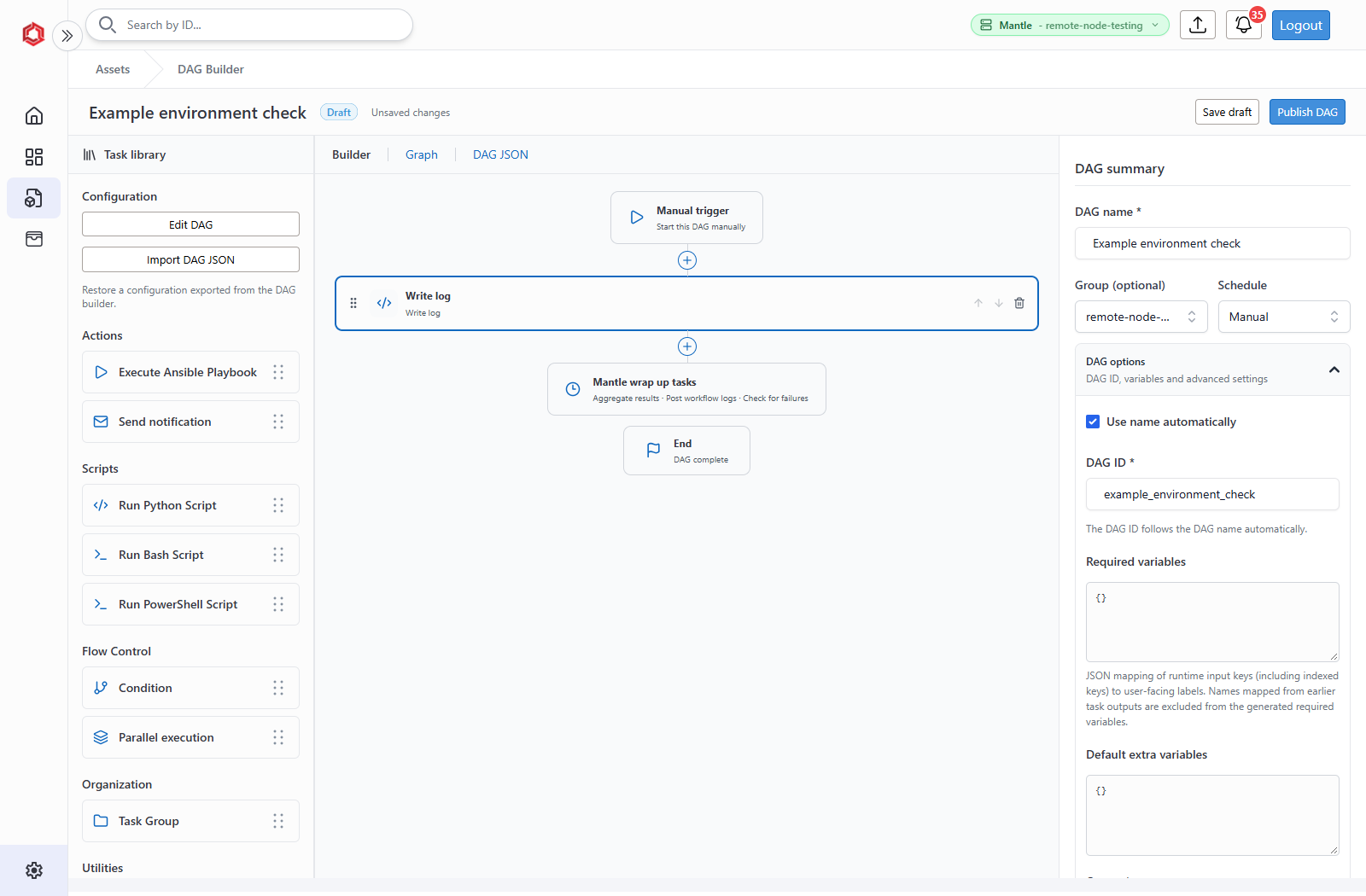
Required variables is a JSON mapping from input keys to display labels, for example {"site_name": "Site name"}. Operators supply these values when deploying a Flow. A task can also consume a compatible result from an earlier task.
Keep Mantle wrap up tasks enabled when the workflow should aggregate results, post workflow logs, and check for failures at the end.
Save a draft and publish
- Select Save draft to preserve unfinished work on the appliance.
- Reopen it from Assets → Drafts, using Open in DAG Builder. These drafts are separate from Plan drafts on the Dashboard.
- Select Publish DAG when the configuration is complete.
- Wait for asset installation and Airflow discovery to finish before selecting the DAG in a Flow. Publishing creates or updates an asset; it does not execute the workflow.
An installation failure leaves the saved draft available for correction. Successful installation removes the published draft snapshot; edits saved while installation is in progress remain available.
Edit an existing DAG
Use Edit DAG in the builder's library, or Actions → Edit in Flow Builder on a builder-created DAG asset. After editing, select Publish DAG, then choose Publish changes to update the asset or Publish as new DAG with a different DAG ID.
Custom Python uploads without saved builder JSON cannot be opened for visual editing. Update those files through asset upload instead. Import DAG JSON restores a configuration exported from the builder; it does not import arbitrary Python source.
Builder-created DAGs record their referenced playbooks and scripts automatically. For custom Python DAGs, declare or select dependencies as described in DAG required assets.
1. DAG Structure
Directed Acyclic Graph (DAG) overview
A Directed Acyclic Graph (DAG) is the core structural component of a Mantle Flow. The DAG defines the workflow's tasks, their execution order, and the dependencies between them.
By organizing automation logic into discrete steps, the DAG controls how those steps are sequenced and executed.
Within Mantle Flow, the DAG acts as the bridge between workflow logic and platform functionality by invoking asset execution, such as playbooks, scripts, and other supported automation components.
DAG file structure
A Mantle Flow DAG is organized into two major sections:
- Variable definition
- DAG definition block
Variable definition
This section defines workflow variables that are consumed during execution.
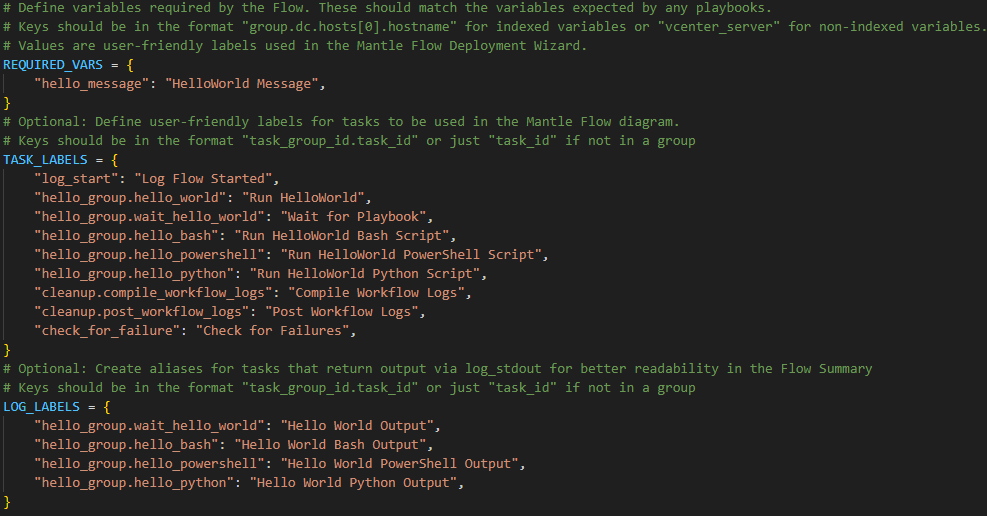
REQUIRED_VARS
A dictionary supplied by the DAG author that defines the variables required for workflow execution.
Format:
REQUIRED_VARS = {
    "variable_name": "display label",
}
TASK_LABELS
A dictionary supplied by the DAG author that defines human-readable labels for tasks within the DAG.
If a task is not included in this dictionary, Mantle Flow displays the task ID as the label.
Format:
TASK_LABELS = {
    "full_task_id": "task label",
}
LOG_LABELS
A dictionary supplied by the DAG author that defines human-readable labels for log output included in the Flow Summary.
DAG authors should only add labels for tasks that are configured to generate output for the Flow Summary.
If a task is not included in this dictionary, Mantle Flow uses the task ID as the log label.
Format:
LOG_LABELS = {
    "full_task_id": "log label",
}
The following example shows the three dictionaries together:
DAG definition block
The DAG definition block is the primary section where DAG authors define workflow behavior.
Within this block, authors:
- Define tasks
- Create task groups
- Establish execution order
- Configure task dependencies
This section represents the main workflow logic.
DAG metadata
When defining a new DAG, the author must provide metadata used by Apache Airflow to configure workflow behavior.
Example parameters include:
dag_id
A unique identifier for the DAG within the Airflow instance. This value must be unique and cannot contain whitespace.
start_date
Defines the earliest possible execution date for the DAG. Mantle Flow does not rely on scheduled DAG execution, so this value is typically set to:
days_ago(1)
schedule_interval
Mantle Flow is designed for manual, run-based workflow execution and does not currently support scheduled DAG runs. This value should therefore be left unset or configured appropriately for manual execution.
catchup
Controls whether Airflow attempts to run historical DAG executions. Since Mantle Flow does not use scheduled runs, this should be set to:
False
default_args
Arguments passed to Airflow that define task behavior and execution characteristics.
Typical configuration:
default_args = {
    "owner": "airflow",
    "retries": 0,
    "depends_on_past": False,
    "trigger_rule": TriggerRule.ALL_SUCCESS,
}
trigger_rule
This parameter defines the default execution behavior for downstream tasks. It determines how task dependencies are evaluated before a task executes.
This value may be modified by the DAG author if alternative dependency behavior is required. See Task execution order for additional details.
tags
A list of tags used to categorize the DAG within Airflow and Mantle Flow.
render_template_as_native_obj
This should always be set to True because it is required to use script assets.
The following example shows the metadata block:

Task definition
Tasks within a DAG are defined as Airflow operators, which represent individual units of work executed during workflow execution.
To define a task, the DAG author calls the constructor for the appropriate operator and supplies the required parameters.
One common example is the PythonOperator, which allows a task to execute a Python function defined within the DAG.
First define the function outside of the DAG definition block:
def helloWorld():
    print('Hello World!')
Then define the task within the DAG definition block:
hello_world = PythonOperator(
    task_id="hello_world",
    python_callable=helloWorld,
)
The resulting task object can then be used to define task dependencies and execution order. See Task execution order for additional details.
DAG discovery in Mantle Flow
When a DAG is uploaded to Mantle Flow, the file is processed and placed in a directory monitored by Apache Airflow for DAG discovery.
Airflow periodically scans this directory to identify new or updated DAG files. The polling interval for this process is approximately 30 seconds.
Once Airflow discovers and processes the DAG, the workflow becomes available as a Flow option in the Mantle Flow Deployment Wizard for any groups to which the DAG has been assigned.
2. Task Groups
Task Group overview
Task Groups are an optional feature that allows DAG authors to logically organize related tasks within a Flow. By grouping tasks together, complex Flows can be structured in a more readable and maintainable format.
Grouping tasks is particularly useful for workflows that contain many steps or multiple phases of automation, such as validation, configuration, and verification stages.
Task Groups do not change execution behavior by themselves. Instead, they provide a way to visually and logically organize Flow components while preserving the dependencies defined between individual tasks. At runtime, Airflow does not factor task groups into task flow evaluation. When evaluation occurs between tasks belonging to separate groups, the execution policies of those specific tasks are enforced.
Logical grouping of tasks
Tasks that perform related functions can be grouped together within a Task Group. Examples of potential grouping categories include, but are not limited to:
- Flow setup tasks
- Configuration tasks
- Validation or health check tasks
- Cleanup and/or reporting tasks
By organizing tasks into groups, DAG authors can separate different Flow stages and make the Flow easier to understand and maintain.
Improving DAG readability
Large Flows may contain dozens or hundreds of tasks. Without organization, these Flows can become difficult to interpret.
Task Groups help improve readability by allowing related tasks to be visually collapsed or expanded when viewing the DAG structure. This allows DAG authors and operators to quickly understand the high-level structure of the automation without needing to examine every individual task.
Creating Task Groups
Task Groups can be defined using the with TaskGroup functionality provided by Airflow. The DAG author must supply the group name and a tooltip value.
# # # ------- HelloWorld Task Group ---------------------------------------
with TaskGroup("hello_group", tooltip="Workflow Setup") as hello_group:
    # Create the first hello_group task using the example provided above
    hello_world = PythonOperator(
        task_id="hello_world",
        python_callable=helloWorld,
    )

    # Create a second duplicate task to demonstrate flow definition
    # Note: task_id values must be unique across the entire DAG
    hello_world_again = PythonOperator(
        task_id="hello_world_again",
        python_callable=helloWorld,
    )

    # Define serial task flow. Execute hello_world, if successful then execute
    # hello_world_again. See Task execution order for more details.
    hello_world >> hello_world_again
Mantle Flow representation
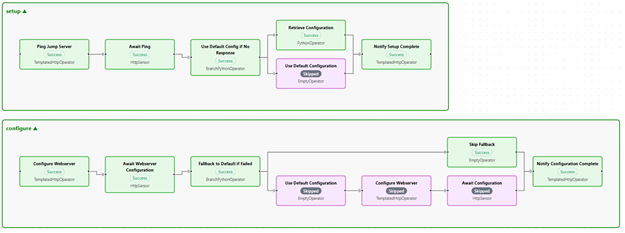
Within Mantle Flow, Task Groups improve visibility when monitoring a Flow's progress using the Flow Diagram. Groups are visibly separated and can be collapsed for a simplified view of a Flow's progress.
3. Task Execution Order
Execution order overview
Task execution order within a DAG is determined by the dependencies defined between tasks. These dependencies specify which tasks must complete before other tasks are allowed to begin.
By defining upstream and downstream relationships, DAG authors can control the sequence in which automation steps are executed.
Upstream and downstream tasks
Each task within a DAG may have one or more upstream or downstream dependency relationships.
- Upstream tasks must complete before the current task can execute.
- Downstream tasks depend on the current task and will execute afterward.
These relationships form the directed structure of the DAG and define the workflow's execution path.
Dependency operators
In Airflow, task dependencies are typically defined using dependency operators.
Common operators include:
task_a >> task_b
This indicates that task_a must complete before task_b executes.
Similarly:
task_b << task_a
This defines the same dependency using reverse syntax.
These operators allow DAG authors to quickly establish execution order between tasks.
Parallel execution
If multiple tasks share the same upstream dependency but do not depend on each other, they may execute in parallel.
Example:
task_a >> [task_b, task_c]
In this scenario:
task_bandtask_cboth depend ontask_a- Once
task_acompletes, both tasks may execute concurrently
Parallel execution allows workflows to complete more efficiently by performing independent operations simultaneously.
4. Conditional Execution
Conditional execution overview
Conditional execution allows workflows to dynamically determine which tasks should run based on runtime conditions.
Instead of executing every task sequentially, conditional logic can direct the workflow down different execution paths depending on workflow inputs, task results, or environment conditions.
This capability enables workflows to support multiple operational scenarios within a single DAG definition.
Branching tasks
Branching tasks are used to determine which execution path a workflow should follow.
A branching task evaluates a condition and selects one or more downstream tasks to execute. Tasks that are not selected are automatically marked as Skipped.
Branching allows Flows to support conditional operations such as:
- Executing different automation paths based on environment type
- Performing validation checks before configuration steps
Conditional paths
Conditional paths define the possible execution routes that a Flow may follow.
For example, a Flow may branch based on the value of a runtime variable:
- Production configuration path
- Development configuration path
Or on the status of an upstream task:
- Success
- Failure
Each path may contain a different set of tasks appropriate for the selected condition.
Skipped tasks
When branching occurs, tasks that are not part of the selected execution path are marked as Skipped.
Skipped tasks do not execute but remain visible in the workflow execution record. This allows users to see which portions of the Flow were bypassed during execution.
This status must be taken into account when defining downstream task trigger rules because a default trigger rule of ALL_SUCCESS will not match Skipped.
Implementing branching tasks in Mantle Flow
Mantle Flow leverages a custom Airflow plugin to provide a helper function that allows DAG authors to easily evaluate the status of upstream tasks and make routing decisions accordingly.
The BranchPythonOperator can be used to execute this helper function and is structured similarly to PythonOperator with two primary deviations.
op_kwargs
The choose_branch helper function requires three arguments:
upstream_task_id| Stringsuccess_task_ids| Listfailure_task_ids| List
These arguments must be the full task IDs, including any Task Groups of which they are members.
trigger_rule
If the upstream task is not configured to generate a graceful failure, the trigger rule of the BranchPythonOperator task must be updated to a value that will allow execution, such as all_done.
BranchPythonOperator based on the previous example:
branch_on_hello_world_result = BranchPythonOperator(
    task_id="branch_on_hello_world_result",
    python_callable=choose_branch,
    op_kwargs={
        'upstream_task_id': hello_group.hello_world',
        'success_task_ids': [hello_group.skip_hello_again'],
        'failure_task_ids': ['hello_group.hello_world_again']
    },
    provide_context=True,
    trigger_rule="all_done"
)
This operator evaluates the status of the hello_world task. If the task failed, hello_world_again is executed; otherwise, the replay is skipped using a dummy task.
5. Variable Injection
Variable injection overview
Variable injection refers to the process by which runtime values are provided to a Flow when it is executed.
These variables allow Flows to receive input parameters that influence automation behavior without requiring modifications to the DAG itself.
Within Mantle Flow, variables are collected during Flow deployment and injected into the runtime configuration for use by any associated automation assets.
Sources of runtime variables
Runtime variables may originate from several sources, including:
- Variables entered manually during Flow deployment
- Uploaded JSON variable files
- Configuration objects supplied during deployment, such as when rebuilding a historical Flow
These inputs allow users to provide the values required for Flow execution.
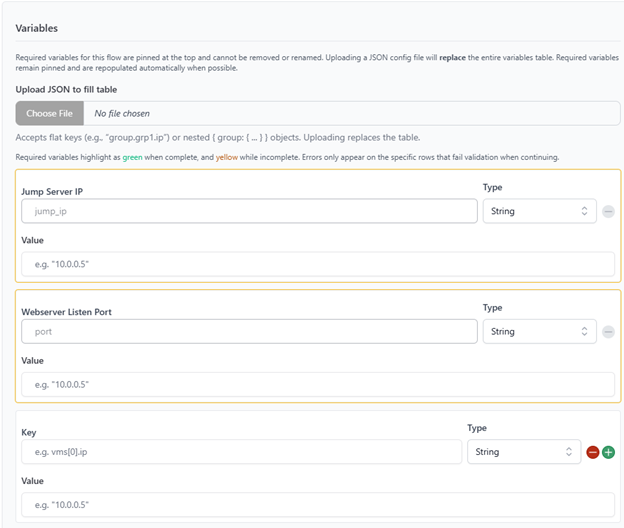
Mantle Flow variable handling
During Flow execution, Mantle Flow processes user-provided variables and injects them into an Ansible inventory file that is accessible within the Mantle Flow runtime environment. For non-playbook asset types, variables are injected into the scripts' runtime environment as environmental variables.
Currently, variables are not directly accessible within the context of the DAG. However, they can bubble up to the DAG level when explicitly passed through playbook output.
Example sample-inv.yml:
{
  "all": {
    "vars": {
      "ansible_user": "administrator",
      "ansible_password": "password123",
      "subnet_mask": "255.255.255.0",
      "domain_user": "admin@mantle.lab",
      "domain_pass": "password123",
      "domain_name": "MANTLE.LAB",
      "default_gateway": "192.168.0.1",
      "vcenter_server": "svcsa.mantle.lab",
      "vcenter_username": "administrator@vsphere.local",
      "vcenter_password": "password123"
    },
    "children": {
      "esxi": {
        "hosts": {
          "esxi1": {
            "ansible_host": "192.168.1.2",
            "ansible_user": "root",
            "ansible_password": "password123",
            "ansible_become_password": "password123"
          },
          "esxi2": {
            "ansible_host": "192.168.1.3",
            "ansible_user": "root",
            "ansible_password": "password123",
            "ansible_become_password": "password123"
          }
        },
        "vars": {
          "ansible_python_interpreter": "/usr/bin/python3",
          "ansible_connection": "ssh"
        }
      },
      "vcenter": {
        "hosts": {
          "svcsa": {
            "ansible_host": "192.168.1.1",
            "ansible_user": "administrator@vsphere.local",
            "ansible_password": "password123"
          }
        },
        "vars": {
          "vcenter_hostname": "svcsa",
          "vcenter_ip": "192.168.1.1",
          "vcenter_username": "administrator@vsphere.local",
          "vcenter_password": "password123"
        }
      },
      "lab_dc": {
        "hosts": {
          "DC-1": {
            "ansible_host": "192.168.0.10",
            "target_cpu": 2,
            "target_memory": 4,
            "target_disks": [90]
          }
        }
      },
      "WEB-1": {
        "hosts": {
          "WEB": {
            "ansible_host": "192.168.0.12",
            "target_cpu": 2,
            "target_memory": 4,
            "target_disks": [90]
          }
        }
      }
    }
  }
}
Mantle configuration object
Mantle utilizes a standardized configuration model tailored to the deployment of tactical kits. This configuration model is heavily utilized by the Mantle Build capability during deployment of an environment. Mantle Flow can utilize and expand upon the configuration generated by a Mantle Build to perform additional, post-deployment tasking. This allows for a seamless transfer of variables between Mantle components.
When not utilizing an externally generated configuration, Mantle Flow uses a dedicated object within the configuration model to pass through any variables required by a Flow.
6. Parameterization
Parameterization overview
Parameterization in Mantle Flow allows Flow tasks to dynamically consume and pass data during execution. Rather than relying solely on static input variables, tasks may exchange data at runtime to influence downstream behavior.
This enables Flows to adapt based on execution results, allowing for more flexible and context-aware automation.
Inter-task data sharing
Within Apache Airflow, inter-task communication is handled through a mechanism known as XCom (cross-communication).
XCom provides a way for one task to store data during execution and make that data available to downstream tasks within the same Flow.
In Mantle Flow, XCom is used as the primary mechanism for passing data between tasks.
Automation asset output handling
When an automation asset such as an Ansible playbook is executed, its output is captured by the Mantle Flow backend.
Relevant output data is then returned to the DAG and stored within XCom. This allows the results of one task to be programmatically accessed by subsequent tasks within the workflow.
Custom Mantle Flow Airflow plugins perform a similar function for script assets.
Generating output using Ansible playbooks
Once an Ansible playbook completes execution, Mantle Flow scans the playbook output for a designated return object. This object is extracted and passed back to the DAG for use in downstream tasks.
Within Mantle Flow, playbooks must define and return a variable named playbook_return_object, which must be serialized to JSON. DAG authors are responsible for defining the contents of this object, converting it to JSON format, and printing it to standard output using a debug task.
If a workflow does not require output data, an empty object ({}) may be returned to satisfy this requirement.
Although Mantle Flow expects a single return object, it is standard practice to structure this object with two child components:
playbook_return_object
- Intended for passing data between workflow tasks
- Consumed by downstream DAG tasks via XCom
- Has no enforced schema; authors may structure this data as needed
log_return_object
- Intended for use in the Flow Summary
- Provides a simplified or human-readable summary of playbook execution
- May include key results, environment details, or other relevant output
- May be left empty if not required
Implementation example:
---
- name: Hello World
  hosts: localhost
  gather_facts: no
  tasks:
    - name: Print hello world
      debug:
        msg: "{{ hello_message }}"

    - name: Log
      set_fact:
        playbook_return_object:
          playbook_return_object:
            hello_message: "{{ hello_message }}"
          log_return_object: "Your hello message was: {{ hello_message }}"

    - name: Convert to json
      set_fact:
        playbook_return_object: "{{ playbook_return_object | to_json }}"

    - name: Print
      debug:
        var: playbook_return_object
Storing output in XCom
A Mantle Flow Airflow plugin includes an HttpSensor helper function. When invoked as a task, this HttpSensor periodically polls the Mantle Flow backend for Ansible playbook status updates.
Once a playbook reports completion, Mantle Flow extracts the return object and returns it to the HttpSensor under the key json_stdout. The HttpSensor task extracts this key and pushes playbook_return_object and log_return_object to XCom.
The DAG author is not required to take any action to ensure these objects are stored.
Accessing stored data
To pass data between tasks, DAG authors must retrieve values stored in XCom at runtime by using the Mantle-provided task_output helper function, which accepts a task object as a parameter.
This is accomplished by accessing the task instance (ti) object and calling the xcom_pull method with the appropriate task ID and key. The retrieved data can then be passed to downstream tasks, such as Ansible playbooks, through parameters like extra_vars.
The xcom_pull method is used to access data produced by a previous task. This requires:
- The task ID of the upstream task
- The key under which the data was stored
If no data is found, a default value, such as an empty object, may be provided to prevent runtime errors.
DAG authors do not need to concern themselves with this process and can instead use the task_output helper.
Passing data to a playbook
Once retrieved, the data can be injected into a downstream task as part of its runtime configuration.
Example:
hello_bash = BashScriptOperator(
    task_id='hello_bash',
    filename='hello_world_xcom.sh',
    vars={"hello_var": task_output(wait_hello_world)},
)
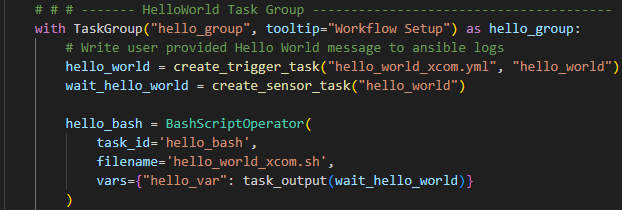
Example (legacy):
parse_hello_output = create_trigger_task(
    "parse_output.yml",
    "parse_hello_output",
    extra_vars={
        "hello_output": "{{ ti.xcom_pull(task_ids='hello_group.wait_hello_world', key='playbook_return_object') or {} }}"
    },
)

In these examples:
- The task
hello_group.wait_hello_worldproduces a return object. - The sensor task (
wait_hello_world) stores the return object, not the trigger task. - The value stored under the key
playbook_return_objectis retrieved from XCom. - The result is assigned to the variable
hello_outputorhello_var. - This variable is passed to the playbook as part of
extra_varsorvars, depending on the asset type.
7. Invoking Automation Assets
Overview
Executing automation assets within a Mantle Flow workflow requires interfacing with the Mantle runtime environment. Rather than invoking playbooks or scripts directly, DAG authors use helper functions provided by the Mantle Flow Airflow plugins to initiate and monitor asset execution.
These helper functions abstract the underlying execution process and ensure that automation assets are executed consistently within the Mantle platform.
Helper functions
The Mantle Flow DAG template provides two primary helper functions for invoking automation assets:
create_trigger_task
- Initiates execution of an automation asset (currently only Ansible playbooks)
- Submits the task to the Mantle execution environment
- Passes any required runtime parameters, such as
extra_vars
create_sensor_task
- Monitors the status of a previously triggered automation task
- Periodically queries Mantle Flow for execution status
- Waits until the task completes before allowing downstream execution
These helper functions work together to manage the full lifecycle of an Ansible automation task.
Execution pattern
Automation asset invocation follows a two-step pattern:
- Trigger task: Initiates execution of the automation asset.
- Sensor task: Waits for execution to complete and retrieves the result.
By separating execution and monitoring into two tasks, Mantle Flow enables better visibility into workflow state and allows task status to be tracked independently.
The sensor task is typically named using the convention:
wait_<trigger_task_name>
This naming pattern helps maintain consistency and readability within the DAG.
Example:
hello_world = create_trigger_task("hello_world.yml", "hello_world")
wait_hello_world = create_sensor_task("hello_world")

In this example:
- The trigger task (
hello_world) initiates execution of the playbook. - The sensor task (
wait_hello_world) monitors execution until completion.
Dependency considerations
When defining task execution order, downstream tasks should almost always depend on the sensor task rather than the trigger task.
This ensures that:
- The automation asset has fully completed before subsequent tasks execute
- Output data is available for retrieval, such as through XCom
- Task status accurately reflects execution results
Example:
hello_world >> wait_hello_world >> parse_hello_output >> wait_parse_hello_output

Since parse_hello_output relies on the output of wait_hello_world, it should be executed after wait_hello_world has completed execution.
8. Mantle Flow Airflow Plugin Reference
Mantle Flow provides two plugin modules for DAG authors:
mantle_operators: operators for running supported automation assets and communicating with the Mantle backendmantle_functions: helper functions for creating Mantle tasks, passing task output, branching, compiling summaries, and sending notifications
These plugins were created to standardize the execution of automation assets in the Mantle ecosystem and simplify the DAG authorship process. The operators and functions below describe the shared author-facing interface in the current Mantle Flow plugin assets. If the template bundled with a specific deployment uses a different signature, follow that template.
Importing the plugins
Most DAGs import script operators directly and use helper functions for playbook execution:
from mantle_functions import (
    aggregate_results,
    choose_branch,
    create_sensor_task,
    create_trigger_task,
    fail_if_upstream_failed,
    post_logs,
    send_notification,
    task_output,
    write_log,
)
from mantle_operators import (
    AnsibleOperator,
    BashScriptOperator,
    PowerShellScriptOperator,
    PythonScriptOperator,
)
The plugin modules are already available in the Mantle Flow runtime. Authors should use the provided operators and functions rather than recreating the backend request and polling logic in each DAG.
Automation asset operators
These operators run uploaded assets in the Mantle execution environment. Each operator creates an Airflow task and accepts a filename and task_id. The vars argument supplies task inputs.
| Operator | Use |
|---|---|
AnsibleOperator |
Run an uploaded Ansible playbook |
BashScriptOperator |
Run an uploaded Bash script |
PowerShellScriptOperator |
Run an uploaded PowerShell script |
PythonScriptOperator |
Run an uploaded Python script |
For scripts, values supplied through vars are exposed to the script at runtime. The operator also produces a task output that can be passed to a downstream task with task_output.
Example:
hello_bash = BashScriptOperator(
    task_id="hello_bash",
    filename="hello_world.sh",
    vars={"hello_var": "Hello from Mantle Flow"},
)

hello_powershell = PowerShellScriptOperator(
    task_id="hello_powershell",
    filename="hello_world.ps1",
    vars={"hello_var": task_output(hello_bash)},
)
Script return objects
Script operators do not infer a return object from arbitrary standard output. A Bash, PowerShell, or Python asset must set the Mantle return environment variables during execution.
The vars argument passed to an operator supplies inputs to the script. The variables below are outputs produced by the script:
| Environment variable | Purpose | Airflow result |
|---|---|---|
MANTLE_RETURN_OBJECT |
Machine-readable data for downstream tasks | Published as the script task's primary output under docker_return_object |
MANTLE_LOG_OBJECT |
Human-readable data for the Flow Summary | Published under log_return_object for aggregate_results |
Return-object lifecycle
For Bash, PowerShell, and Python operators:
- The script builds its result values.
- The script serializes those values to strings and assigns them to
MANTLE_RETURN_OBJECTand, when needed,MANTLE_LOG_OBJECT. - The Mantle wrapper captures the variables when the script exits.
- Mantle Flow publishes the return object to XCom and makes the log object available to Flow Summary aggregation.
Use JSON for structured results. A plain string is also accepted, but downstream tasks will receive it as text rather than as a dictionary or list. Standard output is still useful for logging, but printing a value does not make it the task return object.
Bash example
MANTLE_RETURN_OBJECT='{"status":"ok","items":["host-1","host-2"]}'
MANTLE_LOG_OBJECT='{"summary":"Validation complete","host_count":2}'
PowerShell example
$returnObject = @{
    status = "ok"
    items = @("host-1", "host-2")
}

$logObject = @{
    summary = "Validation complete"
    host_count = 2
}

$env:MANTLE_RETURN_OBJECT = $returnObject | ConvertTo-Json -Compress
$env:MANTLE_LOG_OBJECT = $logObject | ConvertTo-Json -Compress
Python example
import json
import os

return_object = {
    "status": "ok",
    "items": ["host-1", "host-2"],
}

log_object = {
    "summary": "Validation complete",
    "host_count": 2,
}

os.environ["MANTLE_RETURN_OBJECT"] = json.dumps(return_object)
os.environ["MANTLE_LOG_OBJECT"] = json.dumps(log_object)
Passing a script result to another task
Because the script operator publishes its primary result under docker_return_object, downstream tasks can use task_output without manually pulling XCom values:
validate_hosts = PythonScriptOperator(
    task_id="validate_hosts",
    filename="validate_hosts.py",
)

configure_hosts = BashScriptOperator(
    task_id="configure_hosts",
    filename="configure_hosts.sh",
    vars={"validation": task_output(validate_hosts)},
)

validate_hosts >> configure_hosts
The MANTLE_LOG_OBJECT value is published separately under log_return_object. Use aggregate_results to collect those values for a Flow Summary.
BaseDockerOperator is the shared implementation behind these operators. DAG authors normally use the asset-specific subclasses and do not need to instantiate the base class directly.
Playbook trigger and sensor operators
Mantle Flow also provides backend-aware operator classes:
AnsiblePlaybookOperatorsubmits a playbook run to the Mantle backend.AnsibleSensorpolls the backend for the result of a previously submitted playbook.PostLogsOperatorsubmits the compiled workflow log data for the Flow Summary.SendNotificationOperatorsubmits a notification to a Mantle group.
DAG authors generally create these tasks through the helper functions described below. This keeps task IDs, backend request fields, authentication, polling, and XCom behavior consistent.
Standard Airflow operators used with Mantle plugins
Mantle Flow plugins are used alongside standard Airflow operators:
| Airflow operator | Typical Mantle Flow use |
|---|---|
PythonOperator |
Run DAG-local Python logic, such as preparing variables or compiling results |
BranchPythonOperator |
Select a success, failure, or remediation path |
EmptyOperator |
Represent a branch endpoint or merge point |
TaskGroup |
Organize related tasks in the Flow Diagram |
TriggerRule |
Control execution when upstream tasks succeed, fail, or are skipped |
Helper function reference
task_output
Use task_output(task, key=None) to pass a task's XCom output to another operator. The helper returns an Airflow reference that is resolved when the DAG runs.
By default, the helper uses the operator's primary return-object key. Use key when the task publishes a named XCom value.
hello_bash = BashScriptOperator(
    task_id="hello_bash",
    filename="hello_world.sh",
)

hello_python = PythonScriptOperator(
    task_id="hello_python",
    filename="hello_world.py",
    vars={"hello_var": task_output(hello_bash)},
)

custom_value = PythonOperator(
    task_id="custom_value",
    python_callable=produce_value,
)

use_custom_value = PythonScriptOperator(
    task_id="use_custom_value",
    filename="consume_value.py",
    vars={"value": task_output(custom_value, key="result")},
)
For Mantle playbook sensors, task_output(wait_task) resolves the playbook return object. For script operators, it resolves the script return object.
create_trigger_task
create_trigger_task(playbook, task_id, extra_vars={})
Creates the trigger task for an Ansible playbook.
playbook: the uploaded playbook filenametask_id: the unique Airflow task ID for the triggerextra_vars: optional playbook inputs; values may include templated values or XCom references
The helper submits the playbook to Mantle Flow and returns an AnsiblePlaybookOperator. It does not wait for the playbook to finish.
configure = create_trigger_task(
    "configure_hosts.yml",
    "configure_hosts",
    extra_vars={"host_config": task_output(prepare_hosts)},
)
create_sensor_task
create_sensor_task(task_id, strict=True)
Creates the sensor that waits for a playbook started by create_trigger_task.
The sensor task is named wait_<task_id>. It polls Mantle Flow until the backend reports success or failure, then stores the playbook status and returned objects in XCom:
statusplaybook_return_objectlog_return_object
When strict=True, a failed playbook causes the sensor task to fail. Set strict=False when the DAG must inspect the failure and branch or remediate explicitly.
Always place downstream dependencies after the sensor task:
trigger = create_trigger_task("configure_hosts.yml", "configure_hosts")
wait_for_configure = create_sensor_task("configure_hosts")

trigger >> wait_for_configure
choose_branch
choose_branch(upstream_task_id, success_task_ids, failure_task_ids, **kwargs)
Use this callable with BranchPythonOperator to route the Flow according to a sensor's status XCom value.
upstream_task_id: the full task ID of the sensor being evaluatedsuccess_task_ids: task ID or task IDs to run when the sensor reports successfailure_task_ids: task ID or task IDs to run when the sensor reports failure
Task IDs must include their Task Group prefix when the task is inside a group. The branch task should usually use trigger_rule="all_done" so it can run after a non-strict sensor reports a failed backend task.
wait_for_validation = create_sensor_task("validate_hosts", strict=False)

branch = BranchPythonOperator(
    task_id="branch_on_validation",
    python_callable=choose_branch,
    op_kwargs={
        "upstream_task_id": "wait_validate_hosts",
        "success_task_ids": ["configure_hosts"],
        "failure_task_ids": ["remediate_hosts"],
    },
    trigger_rule="all_done",
)

wait_for_validation >> branch
post_logs
post_logs(task_id, logs={})
Creates a task that sends compiled workflow log data to Mantle for the Flow Summary.
Use post_logs after a task that gathers log_return_object values, commonly a PythonOperator whose callable is aggregate_results.
aggregate_results
aggregate_results(LOG_LABELS, **kwargs)
Collects log_return_object values from completed tasks and assembles them into the structure used by the Flow Summary.
LOG_LABELS is a mapping from full task IDs to human-readable labels. Tasks that do not produce a log return object are omitted. When tasks are inside a Task Group, use the full ID in the form group_id.task_id.
Example:
LOG_LABELS = {
    "validation.wait_validate_hosts": "Validation Results",
}

compile_logs = PythonOperator(
    task_id="compile_logs",
    python_callable=aggregate_results,
    op_kwargs={"LOG_LABELS": LOG_LABELS},
    trigger_rule="all_done",
)

post_workflow_logs = post_logs(
    "post_workflow_logs",
    logs="{{ ti.xcom_pull(task_ids='compile_logs') or {} }}",
)

compile_logs >> post_workflow_logs
send_notification
send_notification(task_id, subject="", msg="", group="group_demo")
Creates a task that sends a notification to a Mantle group.
task_id: unique Airflow task IDsubject: notification subjectmsg: notification bodygroup: Mantle group ID that receives the notification
Notifications can be placed at the start, end, or failure path of a Flow.
notify_completion = send_notification(
    "notify_completion",
    subject="Validation complete",
    msg="The validation Flow completed. Review Track Flow for details.",
    group="group_demo",
)
Utility functions
The plugin also includes smaller utilities that can be used in DAG-local tasks:
| Function | Purpose |
|---|---|
fail_if_upstream_failed |
Raises an Airflow failure so a final check task fails when one or more upstream tasks failed |
write_log |
Writes a message to the Mantle Flow log at the plugin's notice level |
dump_all_xcoms |
Prints XCom values for the current DAG run while troubleshooting |
These functions do not create an operator by themselves. Pass them to a PythonOperator when a task is needed.
Common plugin patterns
Use the following patterns when building a Mantle Flow DAG:
- Pair every
create_trigger_taskcall with acreate_sensor_taskcall. - Make downstream work depend on the sensor, not only the trigger.
- Use
strict=Falseonly when the DAG has an intentional failure or remediation path. - Pass task results with
task_outputinstead of hard-coding values or manually constructing XCom pulls. - Use full Task Group prefixes in
choose_branchandLOG_LABELS. - Use
aggregate_resultsandpost_logswhen the Flow should expose a consolidated Flow Summary.